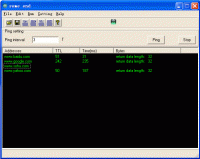
PackPal Ping Utility is a handy and powerful ping program for system administrator or webmaster to check network connection, intended to replace the standard ping program.
PackPal Ping Utility is a handy and powerful ping program for system administrator or webmaster to check network connection, intended to replace the standard ping program that comes with Microsoft Windows forever. Having all standard ping features, PackPal Ping Utility has a nice user interface, so you do not need to launch the command prompt window to ping a host.
Main feature:
1.Start or stop a ping at your wish .
2.Set the Ping interval time.
3.Choose to ping one address (a domain name or an IP address) or a group of addresses at one time.
4.Auto start the PackPal Ping Utility when your computer starts up.
5.Save history information about ping sessions into Log files.
6.Save a group of IP addresses or domain names into *.ipl files and load the files when needed.
7.Check out the location of a specific IP address/domain name/URL
8.Check out the domain name for a specific IP address or the IP address for a domain name.
9.Evaluate the connection by approximate speed.
10.Have a detailed report on each ping about the IP address, domain name, location of the IP address, approximate speed and some statistical information.
11.Draw an URL from a website and monitor the connection.
12.Statistical information is available such as Packet size, total number of sent packets, total number of received packets, the loss rate, minimum, maximum and average time of the ping session.
13.Email setting. Send reports by email, such as send the stored address log; send program miscode; send your stored information or the email written by yourself.
14.User-defined data length.
15.Show details about the ping packet, such as Icmp type, Icmp code description, Icmp sourceip, Icmp destIP, Pocket size, timeout, TTL and Datastr.
WinSuperKit is a powerful network, file compare toolkit that helps you to get ip address and geographical location, monitor network speed.
Price: $79, Rating: 10, Downloads: 78 Download
Ping-Probe offers a comprehensive suite of networking tools. Each of the tools offers a modern interface and flexible functionality. Tools include Ping, Traceroute, Port Scanner, Network Scanner, SNMP, Bandwidth Monitor, DNS, Finger, Whois & LDAP.
Price: $38.00, Rating: 9, Downloads: 47 Download
IP Country Lookup is a free application for Windows that lets you lookup the country associated with an IP address or hostname.
Price: $0, Rating: 10, Downloads: 46 Download
Visual replacement for the standard ping utility. It helps you monitor TCP/IP targets, by sending echo requests and displaying the responses over a detailed list and a graph. It has all the functions of classical ping, and much more.
Price: $0, Rating: 5, Downloads: 44 Download
User Rating
Rating:2.2 out of
5 Based on13 ratings.
13 user reviews.

 PackPal Ping Utility 2.1.2 details