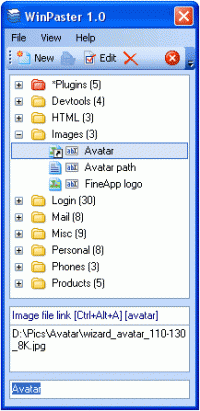
Quickly paste your own text, graphical or other type of data to any application using a list of records, prepared beforehand. Another way is using keystrokes and hot keys for quick access to needed records.
WinPaster allows to quickly paste a text, graphical or other type of data, prepared beforehand, into any application, using clipboard.
WinPaster is loaded into a tray and can be invoked at any moment by clicking on hot keys or by clicking with a mouse on the icon. In the displayed list, it will be necessary to select a needed record and press Enter.Another way is using keystrokes and hot keys for quick access to needed records. Then, the selected data will be copied to the clipboard and automatically pasted into an application you have been working with right before you have invoked WinPaster.
To create a new record, you will need to simply copy required information into the clipboard and invoke the dialogue of creating a new record by pressing hot keys or from the WinPaster window. Records, depending on the data type, may be of the following kinds: Text, Image and Raw Clipboard. In case of a Raw clipboard, WinPaster copies data of all formats from the clipboard into its database. This is necessary, for example, in case you would like to save a formatted text with the description of fonts, style and color, or other specific data.
Besides, you can also indicate a file with a text or an image, which content will be used on pasting of data.
Plugins are a separate kind of records. When using plugins, small applications, which provide with specific information or interact with a user, are started. For example, the plugin Time allows to paste a current date and time, and the plugin Cal?ulator allows a user to make quick calculations and use a result for the paste action.
Records may be grouped into folders.
WinPaster keeps all required data in a folder, where it is installed. This is why you can install it or copy it to a flash drive and run it on any computer. Whats new in version 1.2.0: Restore text clipboard, fixed errors Requirements: Standart PC, 5 Mb on HD or flash-driveD Operating system: WinXP,Windows2003 Limitations: 20 custom records, limited set of plugins Release notes: Major Update
Adensoft Audio/Data CD Burner lets you quickly and easily to create high-quality audio cds from your MP3 files,It can also allows you to burn files or directories to your cd directly.
Price: $29.95, Rating: 2.5, Downloads: 56 Download
Lomtec ActiveWeb Professional is a full-featured web CMS. It enables non-technical business users to author and publish their own web content while reducing both costs and time spent in updating, and automating web content publishing workflow.
Price: $2950, Rating: 3, Downloads: 46 Download
Vika Clipboard extend your clipboard size to 30 items. Also Vika save clipboard state beetween system restars. You can access to all Vika features using only keyboard keys: CTRL+ALT+(SPACE or Arrow keys).
Price: $19.95, Rating: 4, Downloads: 44 Download
Recover Data for Pen Drive Software is best pen drive recovery utility to recover pen drive data from format, corrupt or damage pen drives. Pen drive file recovery software recovers lost files & missing directories from inaccessible pen drive.
Price: $39, Rating: 10, Downloads: 44 Download

 WinPaster 1.2.0 details